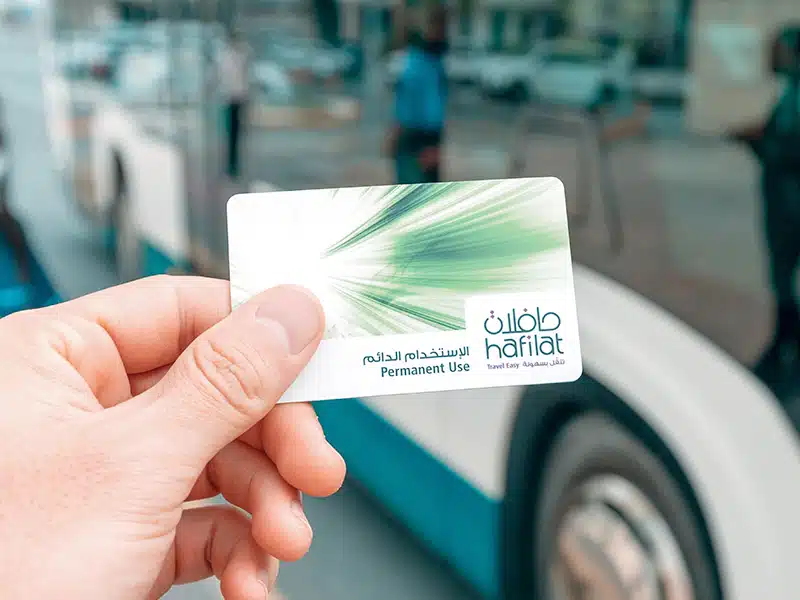
Riding a public bus in Abu Dhabi can become highly stressful if your transport card fails at the door. Many daily commuters get stuck because the official website displays an “Invalid Card Format” error, or the bus scanner suddenly flashes an unexpected red light. To make things more confusing, old tricks like checking via SMS or third-party apps do not work anymore, and traveling with an incorrect balance can cost you a heavy 200 AED fine.
To solve these exact headaches, Abu Dhabi Mobility has upgraded the system. In 2026, all transport services are unified inside the official TAMM government network. This step-by-step friendly guide will help you run a successful hafilat balance check in less than 30 seconds without any errors.
Quick Answer: How to Check Hafilat Card Balance
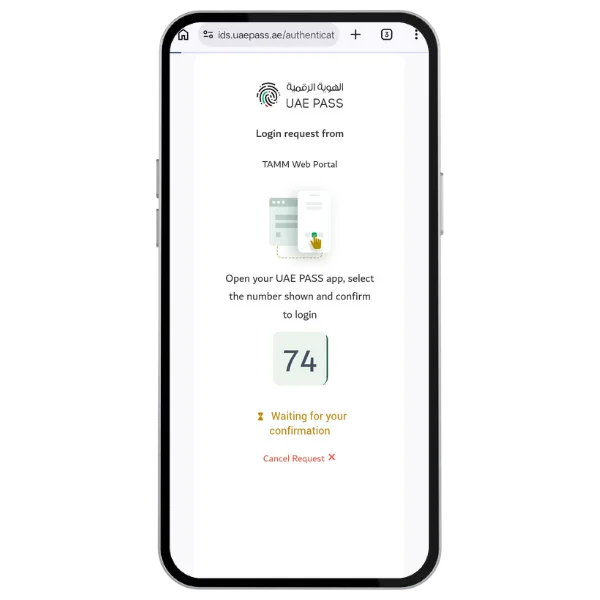
- With Internet (Logged-In Check): If you want to check your official account profile online, you must log into the TAMM Web Portal or open the TAMM app on your phone using your secure UAE Pass.
- Without Internet (Anonymous Check): If you do not have an online account or mobile data, you can check your balance anonymously. Just tap your card on an Onboard Bus Validator inside the bus or insert it into a Ticket Vending Machine (TVM) at any station kiosk.
Best method for most users
Checking your balance online before you leave your house is the smartest choice. It lets you see your funds early so you do not get stuck. If your wallet is low on funds, you can add money instantly on that same screen. However, if you are already standing at the bus stop, tapping your card on the plastic Bus Validator screen inside the bus gives you an instant, free answer without needing any internet connection.
What card number or serial number do you need?
To check your money, look at the back of your plastic card. You will see a long line of numbers printed on the shell.
- The Prefix Trim Trick: When typing your card number into the website, do not type the starting
01-For example, if your card shows: 01-123456789123564, you should only type the core serial digits: 123456789012345. If you include the prefix, the system will fail and show an error.
Personally Tested Result
Recharge Method Audit
Serial Number (Without “01-“)
Entering the card serial number by skipping the “01-” prefix.
Full 16-Digit Card Number
Typing the complete 16-digit number printed on the card.
SMS to 3009
Sending a balance check message to the official shortcode.
USSD Code *163#
Dialing the quick code from the mobile dialer.
Payit Wallet
Could not find a working Hafilat balance or recharge option inside the app.
This is why I recommend using official online services, TVM machines, bus validators, or customer support instead of wasting time on outdated SMS and USSD methods.
What Is a Hafilat Smart Card?
A Hafilat card is a rechargeable smart card used to pay public bus fares in the Emirate of Abu Dhabi. You tap the card on the bus reader when boarding and alighting. The fare is then calculated and deducted from your card balance.
The card is useful for residents, workers, students, tourists, and daily public transport users in Abu Dhabi, Al Ain, and Al Dhafra. Abu Dhabi Mobility describes Hafilat smart cards as public transport fare-payment cards that are tapped on reader devices when boarding and alighting.
Types of Hafilat Cards
There are different Hafilat card types depending on the user and purpose.
The anonymous Hafilat card is easy to get and can be used for regular public bus travel. Abu Dhabi Mobility currently lists the anonymous card price as AED 10 and says it is valid for 16 years. It also notes that anonymous cards do not offer balance transfer in case of damage or loss unless linked to a UAE identity card.
Personalized cards and special permits may be used by eligible users. If you need a special card, a senior citizen card, a student-related service, or people-of-determination support, confirm the current requirements from Abu Dhabi Mobility or Customer Happiness offices.
Hafilat Card Balance Check (Online & Offline) Methods
Using a standard web browser on your smartphone or computer is a very easy way to look at your transit funds before you travel.
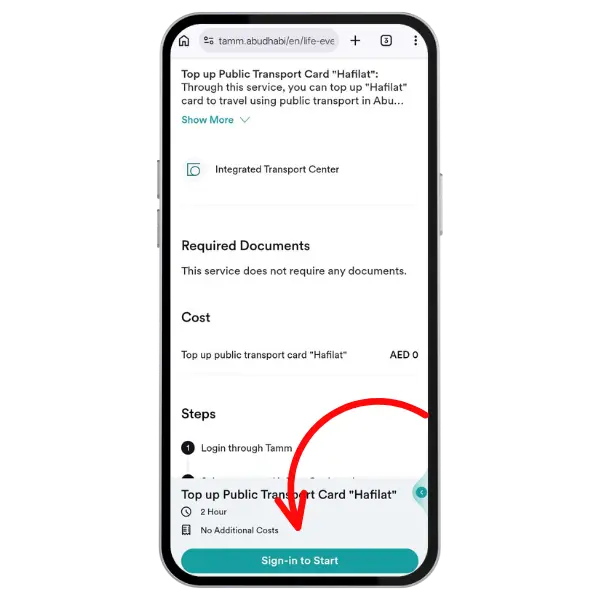
Method 1: Official TAMM Website/Portal
The most reliable way for a Hafilat balance check online was previously through the ITC portal, which has now been integrated into TAMM.
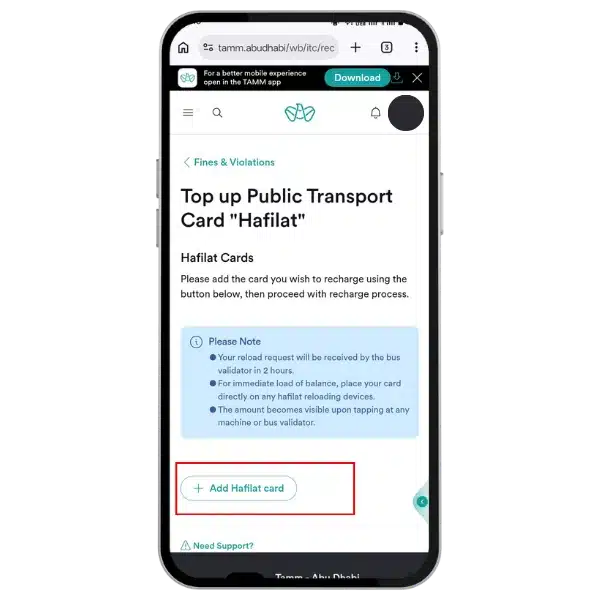
Open Portal
Open the official Hafilat / TAMM service page.
Select Service
Choose the balance, recharge, or card service option available on the official portal.
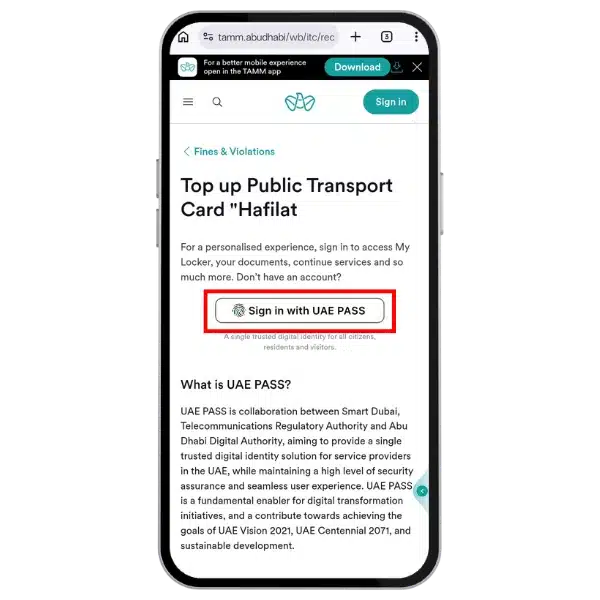
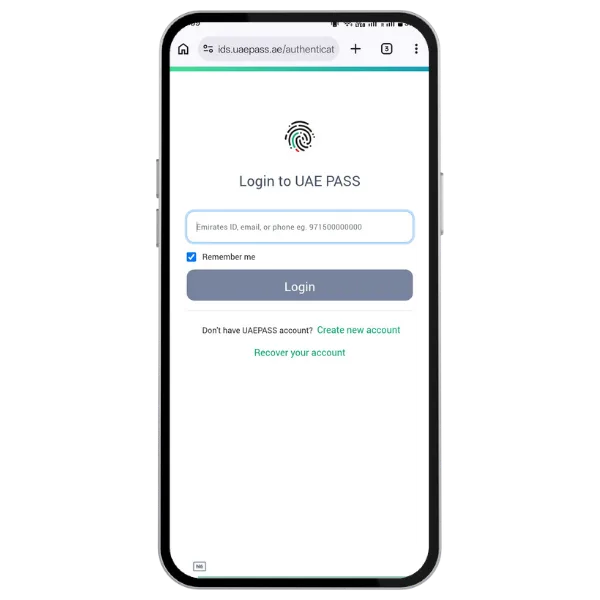
Authenticate
Sign in securely if the portal asks for UAE Pass or account access.
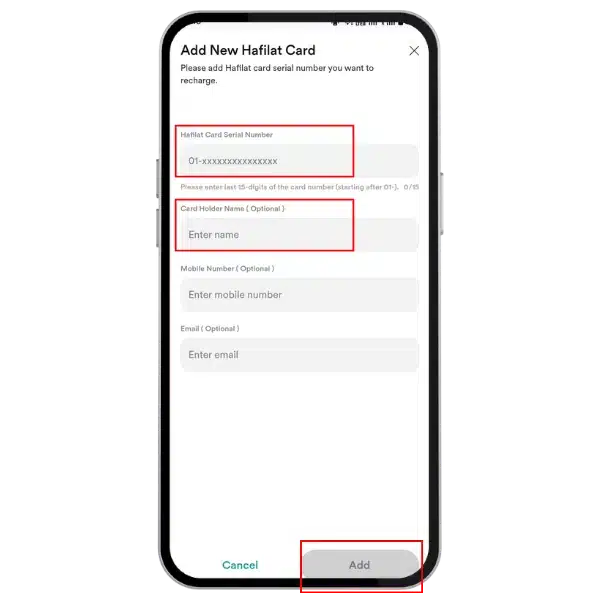
Add Card
Add your Hafilat card if it is not already saved in your account.
Input Details
Enter the card serial number in the exact format requested by the portal.
Prefix Trim Trick
If your card number starts with “01-”, try entering only the serial number without that prefix.
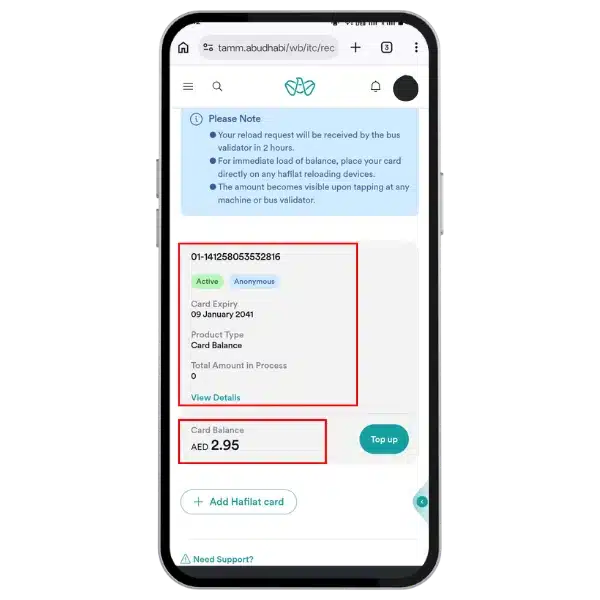
Submit Request
Submit the request and wait a few seconds for the portal to fetch your card details.
View Status
Check the available balance, card status, card type, or any pending recharge amount.
Note: If the portal tells you your card number is not accepted, make sure you did not leave any accidental blank spaces at the start or end of the text box.
Hafilat Balance Check Online via TAMM App
The official TAMM app is now one of the most practical mobile options for checking your Hafilat card balance and managing related transit services in one place. After signing in securely with UAE PASS or registering through the app, you can access Hafilat features directly from the Mobility section.
Beyond balance checking and card recharge, TAMM also gives users access to helpful transport tools such as journey planning and other Abu Dhabi government services. This makes it a better option for commuters who want to manage key travel tasks from one app.
Need help setting it up? Follow our complete Hafilat Card Balance Check App Guide to learn how to add your card and view your balance through TAMM step by step.
Short Video Guide for Hafilat Balance Check 2026
DARBI App and DARB App Confusion
Many users confuse DARBI and DARB, but they are not the same.
- DARBI is related to Abu Dhabi public transport information. People use it or search for it for bus routes, bus timings, journey planning, traffic updates, and other transport details.
- DARB is different. It is mainly linked with Abu Dhabi toll gate services for private vehicles. It is not the main place to check a Hafilat card balance or recharge a public bus card.
If your goal is to check your Hafilat balance, recharge your card, or find public bus travel information, use the official Hafilat service, TAMM portal, TAMM app, ticket vending machines, bus validators, or customer support. Do not confuse Hafilat bus card services with DARB toll gate services.
Based on our test, we would not call the DARBI mobile app the most reliable direct balance-check method for every user. It may still help with journey planning and bus timing information, but for Hafilat balance checking, safer options are the TAMM portal, TAMM app, TVM machine, bus validator, or official support channel.
Offline Ways to Check Your Bus Card Balance Anonymously
If you do not have internet access, a phone battery, or a UAE Pass account, you do not need to worry. You can find your balance completely anonymously using physical offline tools in the real world.
Use a Ticket Vending Machine (TVM)
Walk up to any automated Ticket Vending Machine installed across central transit terminals or airport lounges. Wake up the interactive monitor by touching the screen, select your language, and place your plastic card flat into the designated cardholder slot tray. The machine will instantly scan the internal microchip data and display your remaining dirhams on the video monitor.
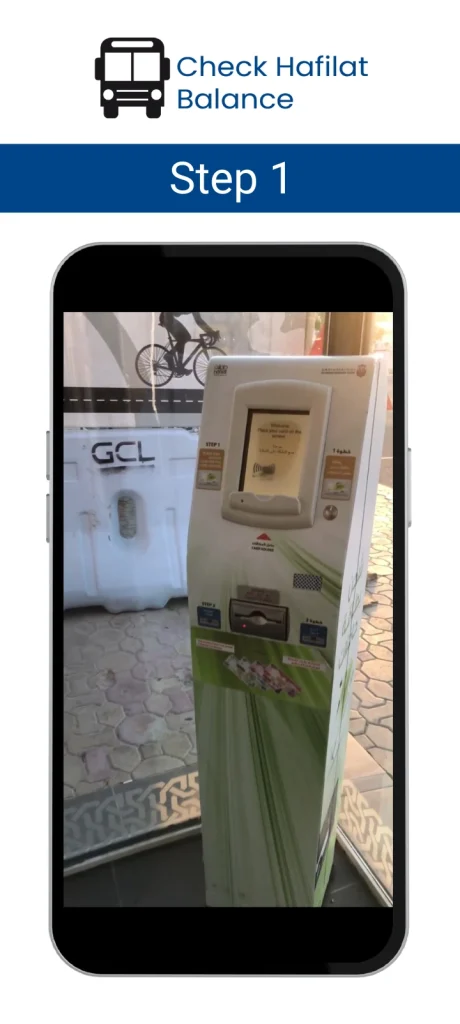
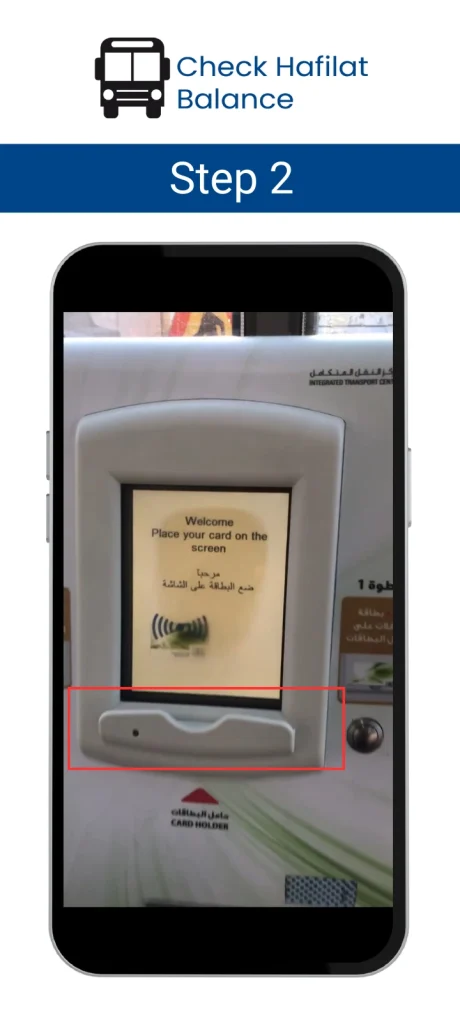
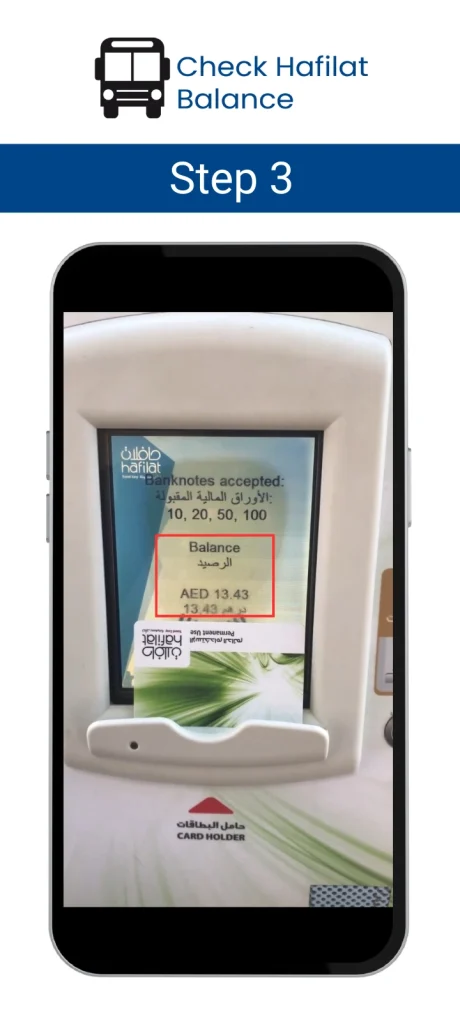
Pro: If your balance is sufficient for the trip, simply pick up the card; otherwise, recharge your Hafilat card immediately from the Ticketing Vending Machines (TVM).
Hafilat Bus Card Balance Check (TVM) Machines are located in different areas
These are Abu Dhabi’s famous bus stations and airport locations where Ticketing Vending Machines (TVMs) are available for checking Hafilat balances and recharging cards.
Al-Sila Bus Station
Zayed Airport
Abu Dhabi International Airport
Bani Yas Bus Station
Ghayathi Bus Station
Madinat Zayed Bus Station
Mussafah Bus Station
Shahama Bus Station
Al-Ain Bus Station
Use the Onboard Bus Validators
Inside every municipal bus in Abu Dhabi, you will see orange or blue colored machines mounted right next to the doors. These are smart NFC bus validators. When you step inside the vehicle, tap your card flat against the circular scanning target zone. The console device will make a quick beep and show your current T-Purse wallet balance on its digital screen for two seconds.
- Green Light Meaning: The beep sound is normal, the light flashes green, and your balance is perfectly safe for travel.
- Red Light Meaning: The machine makes a long beep for 4 to 5 seconds and shows an ominous red light. This is an urgent warning that your card balance is low, or your card profile has expired or been blocked. You must reload it immediately to prevent formal transit penalties.
Check at Retail Customer Desks
You can also get a quick anonymous balance check by handing your card to a cashier at official partner counters. You do not need to share your private Emirates ID number, phone number, or personal details just to see your balance; the agent only needs to scan the card sequence. Working retail partner counters include:
- Distributed local branches of Lulu Hypermarket and Lulu Exchange windows.
- Central checking desks inside the Abu Dhabi Cooperative Society and Al Ain Cooperative Society.
- Interactive MBME Smart Kiosks located inside major regional shopping malls.
Use customer support if your card is not working properly.
Balance not updating
Your card is blocked
Your card has expired
Your card is damaged
Your card was lost
TVM cannot read card
Before calling, keep your Hafilat card with you. The agent may ask for your card serial number or other card details.
Customer Happiness Offices
Customer Happiness offices can help with public transport services, card issues, lost-and-found, and other support requests.
This option is useful for serious card problems. It is also helpful for visitors arriving at Zayed International Airport who need in-person guidance before using public buses. Abu Dhabi Mobility lists Customer Happiness offices at bus stations and the airport among Hafilat card purchase locations.
Can I Check Hafilat Balance via SMS or USSD Number?
No, you cannot check your Hafilat card balance using SMS text messages or USSD phone codes. While many older internet blogs claim this is possible, recent field testing confirms that these legacy telecom methods have been permanently decommissioned by the transport authorities.
Please be aware of these deactivated services to avoid wasting your mobile phone credit:
- The SMS 3009 Method: Sending a text message with the word “BAL” followed by your card number to 3009 is completely deactivated. It will not return your balance today.
- The USSD *163# Code: Dialing this mobile phone menu system returns a network error, as the service is dead.
For true and secure balance verification, you should strictly use the official TAMM portal, the TAMM mobile app, or physical Hafilat station kiosks.
Can I Check My Hafilat Card Balance in Payit Wallet?
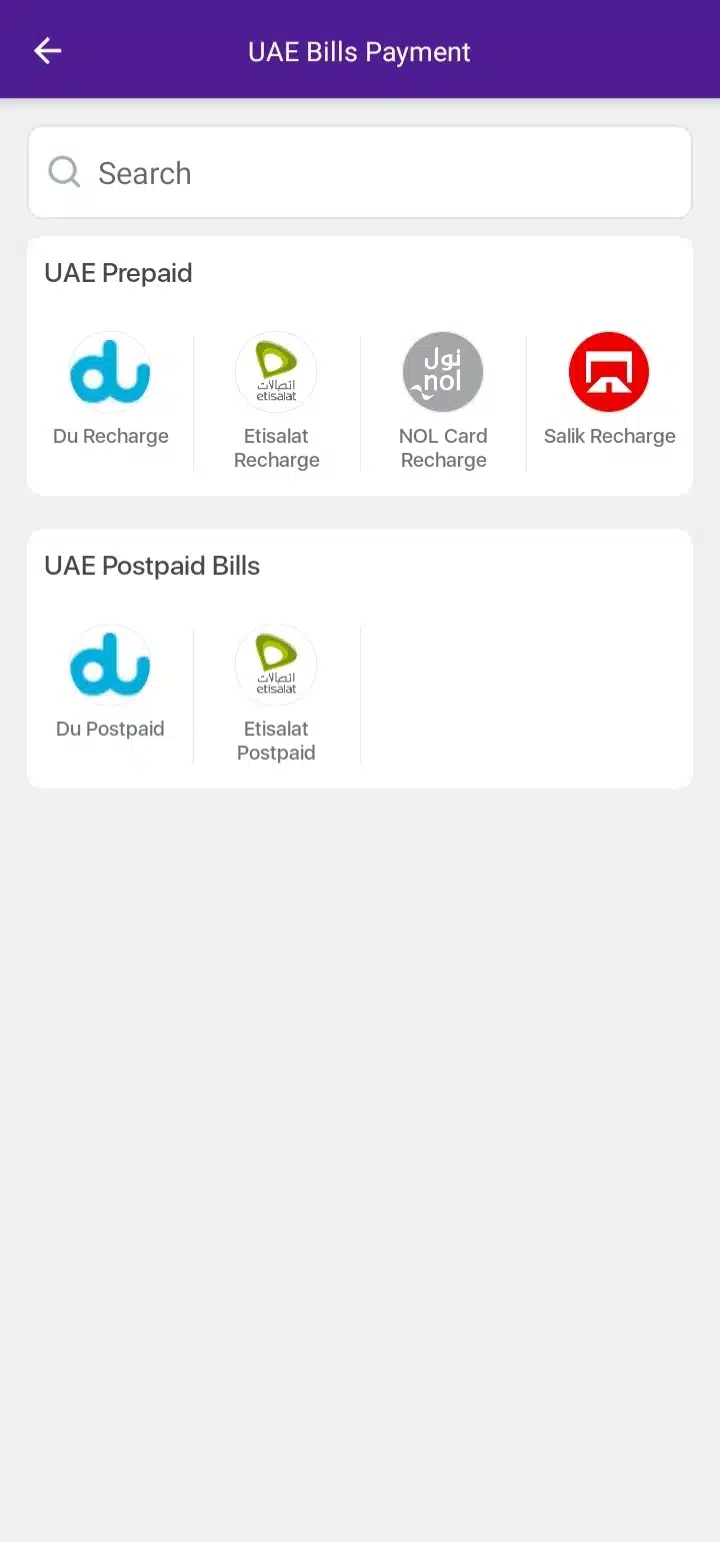
No, currently, you cannot check your Hafilat card balance using the Payit Wallet app. While some online resources and even the official Payit blog state that this feature is available, real-time testing of the current Payit app in the UAE shows otherwise. If you open the Payit app today, you will only find payment and recharge options for Etisalat, Du, Salik, NOL Card, and standard mobile recharges. There is no dedicated option or icon for Hafilat card management.
Abu Dhabi Bus Card Balance Check Methods Compared
TAMM Top-Up Service
Mobile (On-the-go)2026 Note: Top Choice! Excellent for NFC tap-check & bus tracking.
Bus NFC Validator
Inside Any Bus2026 Note: Free & Offline. Best for an instant check while boarding.
Official TAMM Portal
Online Portal2026 Note: Best for remote checking; Requires UAE PASS login.
TVM Machines
Stations / Airport2026 Note: No internet needed; Physical card required for check.
Payit Wallet
Mobile App2026 Warning: NOT WORKING. Currently does not support Hafilat services.
SMS / USSD Codes
Mobile Phone2026 Warning: OUTDATED / FAKE. Don’t waste your mobile credit on these.
Hafilat Recharge Limit, Validity, and Balance Update Time
This section is important because many users recharge their cards and then worry when the balance does not show immediately.
Abu Dhabi Mobility says the maximum balance that can be credited to a Hafilat card is AED 150. The balance is valid for three months from the recharge date. To activate balance usage before expiry, use the card for travel or tap it on sales and recharge machines.
Balance update time depends on the recharge method.
- Sales and recharge machine or TVM: balance reflects immediately.
- Recharge machine: balance reflects immediately.
- Customer Happiness Center: balance reflects immediately.
- MBME recharge machine: balance may reflect after around two hours.
- Website recharge: balance may reflect after around two hours.
If you need to board a bus soon, use a TVM or a recharge machine. If you recharge online, wait before travelling because the amount may not appear instantly.
Common Hafilat Card Problems and Fixes
Serial Number Not Working
Check the number carefully.
If your serial number fails during a Hafilat balance check, ensure you are removing the ’01-‘ prefix as mentioned in our 2026 update.
If the portal still does not accept the number, use a TVM machine or call 800555.
Balance Not Updating After Recharge
Check how you recharged.
- If you used a TVM or sales and recharge machine, the balance should reflect immediately.
- If you used website recharge or MBME, it may take around two hours.
- If the balance still does not update after that, check through a TVM or contact support.
Card Shows Red Light on Bus Validator
A red light, long beep, or warning message may mean low balance, expired card, blocked card, or card reading issue.
Do not keep tapping repeatedly without checking the problem. Step aside safely, check at a TVM if available, or ask station staff for help.
You Forgot to Tap Out
Always tap when boarding and alighting.
Abu Dhabi Mobility says the fare is calculated based on the distance travelled between boarding and alighting.
If you forget to tap out, your fare may not calculate correctly. So make tapping out a habit before leaving the bus.
You Are at Zayed International Airport
If you are a visitor landing in Abu Dhabi, look for official transport help points, Customer Happiness offices, or sales and recharge machines.
Airport support is useful if you need to buy a card, recharge it, or ask how to travel by public bus.
You Are in Dubai
Hafilat is for Abu Dhabi public buses. Dubai uses Nol cards.
Do not use Dubai RTA or Nol card instructions when trying to check an Abu Dhabi Hafilat card. If you travel between emirates, check the correct card and transport system before starting your trip.
You Have a Temporary or Anonymous Card
Anonymous cards are easy to buy, but balance protection may be limited.
Abu Dhabi Mobility says anonymous cards do not offer balance transfer in case of damage or loss unless linked to a UAE identity card.
If you travel regularly, consider confirming whether linking or personalizing your card is useful for your situation.
Smart Ways to Maintain Your Hafilat Card Balance
Keep enough balance for at least one trip before boarding.
- Use a TVM if you need instant balance confirmation. Do not depend on website recharge right before boarding because online recharge may take around two hours.
- Set a weekly reminder if you travel daily. Before leaving, check the latest Hafilat bus timings and routes so you can avoid long waiting times at the stop.
- Use a 7-day or 30-day pass if your travel pattern fits the pass rules.
- Tap correctly when boarding and alighting. Keep your card safe, especially if it is anonymous.
Avoid SMS, USSD, and third-party app methods unless they are officially confirmed.
Safety and Privacy Advice
Only use official government or transport channels for card services.
- Do not enter UAE Pass details, Emirates ID, payment card details, or personal information on random websites.
- This website is an independent guide. It does not check, store, process, or verify your Hafilat card balance.
- The number field in the hero section only helps users understand the correct serial number format. It should not be treated as an official balance checker.
If any website looks official but does not belong to Abu Dhabi Mobility, TAMM, or the official Hafilat/DARBI service, be careful before entering your card or personal information.
Final Thoughts
For most users, the safest method is simple.
- Check online before traveling if you have internet.
- Use a TVM if you need instant confirmation.
- Tap correctly when boarding and alighting.
- Use customer support if your card is blocked, expired, damaged, lost, or unreadable.
My April 2026 UAE test showed that the old full 16-digit method may not work for some users. If the official portal asks for the card serial number, use the serial number without the “01-” prefix.
Avoid outdated SMS and USSD methods unless they are officially restored. Whether you choose the online portal or a physical kiosk, keeping a regular Hafilat balance check habit ensures a smooth journey across Abu Dhabi. If you find your balance is low, you can follow our updated guide on how to recharge your Hafilat card online.
Disclaimer
This is an independent guide based on personal testing from inside the UAE and official public information available at the time of review. This website is not affiliated with or endorsed by Abu Dhabi Mobility, TAMM, DMT, ITC, DARBI, DARB, Payit, Lulu, or any UAE government authority.
Transport rules, fares, pass prices, balance limits, service links, app features, and recharge procedures can change. Always confirm the latest details through Abu Dhabi Mobility, TAMM, the official Hafilat/DARBI service, or public transport support before making payment or travel decisions.
Frequently Asked Questions